How to Get Your First Client With Cold Email in 2026 (Full Walkthrough)
Cold email doesn't fail because of your inboxes or your template. It fails because of the decisions you make before you write a single word like who you target, why you're contacting them right now, and what you're offering them in return for a reply. This post walks through those decisions, then shows you how to turn them into a live campaign of personalised emails in about 20 minutes.

The problem with most cold email advice
If you've tried cold email, you've probably worked out that it isn't as easy as people make it sound.
The advice is always the same. Buy some inboxes. Build a big lead list. Copy this template. Send a few hundred a day and you'll have booked calls by Friday.
So you do all of that. And nothing happens.
Not because you did the steps wrong. Because the steps aren't what makes cold email work. Like every other client acquisition channel, there are fundamentals sitting underneath it that actually decide whether you get replies:
Who you're targeting
Why you're targeting them specifically
What you're offering
Whether there's a reason for them to care right now
How relevant the email actually is to their situation
How you follow up
And whether the email even reaches the inbox
You can have perfect deliverability and still get zero replies. A 100% open rate means nothing if you're emailing the wrong people about something they don't care about.
It's never one thing that gets you a reply. It's all of those things working together.
Normally, learning them well enough to actually get results takes months of trial and error and a lot of burnt domains. So the rest of this post does two things: it explains the fundamentals properly, then shows you how to execute all of them without spending months becoming a cold email expert.
Part 1: The five decisions that actually determine your reply rate
If you get these five right and write mediocre emails, you'll do better than someone with perfect copy and a bad list.
1. Target a sub-segment, not an industry
"Recruitment agencies" is not a target. It's a category.
The problem with targeting a whole industry is that the message has to be vague enough to apply to all of them, which means it lands specifically on none of them. A 12-person tech recruitment agency in London and a 300-person healthcare staffing firm have almost nothing in common operationally.
A sub-segment is narrow enough that you can say something true and specific about their situation. Tech recruitment agencies under 20 people who bill on contingency. Healthcare staffing firms running their own compliance in-house.
The tighter the segment, the more the email sounds like it was written just for them.
2. Use signals so you have a reason to be in their inbox
A signal is an observable piece of evidence about a prospect that suggests they might need what you sell right now.
Job posts that have been live for six weeks. A recent funding round. A new hire in a specific role. A page on their site that's obviously out of date. Reviews mentioning a particular complaint. Hiring for a role you could replace.
Signals matter for two separate reasons, and people usually only think about the first one.
They make the outreach relevant. Instead of "I can help you with X," you get to say "I noticed this, which is why I'm reaching out." That's a completely different email. One is a pitch, the other is a response to something real.
They filter for timing. Fitting your target audience doesn't mean having the problem today. Plenty of businesses match your ICP perfectly and simply don't need you this quarter. A signal is evidence that they might. It's the difference between a list of people who could buy and a list of people who have a reason to reply this week.
Stack signals where you can. If a prospect matches two relevant signals instead of one, you have far stronger evidence they're worth contacting, and you have more material to write with. Two signals also usually means a much smaller, much better list.
3. Lead with a micro offer, not a call
Here's where most people lose.
The default cold email ends with "worth a quick 15-minute call?" And the answer is no. These people don't know you, don't care about you, and have no reason to give you 15 minutes of their day based on one email from a stranger.
Every cold email campaign that actually works leads with value first. You give them something before you ask for anything.
A micro offer is a small piece of work built for one specific prospect like an audit, a rewritten job post, a teardown of one page, a short recorded walkthrough, etc that you offer for free in the first email.
The distinction that matters is specificity:
Lead magnet | Micro offer | |
|---|---|---|
Built for | Thousands of people | One person |
Personalisation | Generic, no name | Their business, their situation |
Format | Long PDF or guide | Short and specific |
Relevance | Might apply to them | Definitely applies to them |
Example | "10 Ways Agencies Increase Sales" | "Here's what's costing your agency sales" |
A lead magnet tells them what the industry should do. A micro offer tells them what they should do. And it's the difference between an ignored email and a reply.
One thing to clear up: you only build the micro offer once someone replies. You are not making 300 audits. Realistically 90% of your list will never respond. So you only build one when someone responds.
4. Structure the offer as a problem-solution loop
This is the bit that turns a free thing into a paying client.
A problem-solution loop is where you point out a problem, provide a solution, and that solution creates a second problem, which is the one you charge to solve.
Concrete example. Say you're a recruitment agency targeting SaaS companies hiring for roles you place. You notice a job post that's been live for six weeks, which suggests they're struggling to fill it.
The micro offer: you rewrite their job post so more people apply to it. Problem solved, they were struggling for applicants, now they've got them.
The problem that creates: more applicants doesn't mean good applicants. Now they've got a pile of CVs to sort through and still no hire.
Where you come in: that second problem is your paid service. You find them quality candidates and get the role filled.
The loop is what makes the free work lead somewhere instead of just being free work. If your micro offer solves the problem completely, you've done a favour and ended the conversation. If it opens the next door, you've started one.
When you're choosing micro offers: only pick things you can actually deliver. Nothing kills momentum like someone saying "yes, send it over" and you realising you can't build it.
5. Make your follow-ups worth opening
Most follow-ups are "just bumping this up" or "any thoughts on the below?" Those are asking for something again, having given nothing the first time.
High-converting campaigns follow up with value. Each email teaches them something useful, so even if they never reply, they got something out of it.
Here's what that looks like in practice, using the same recruitment example:
Subject: SDR listing
Hey [Name],
Once an SDR listing's been up for a couple of weeks the strong applicants have usually dried up and it starts going quiet.
A good fix is adding a few similar role titles to the same listing as the algorithm reads it as higher demand and keeps pushing it out past that first spike.
If useful, I rewrote your listing with those titles already in.
Want me to send it over?
Look at what each part is doing:
Restate the problem in a way that shows you understand their situation
Give a real tip that works whether or not they ever talk to you
Reveal you've already done it for them
Ask a tiny question: "want me to send it over?" is a much smaller ask than a call
Even if they read it and close it, they've learned something. That's a fundamentally different relationship to "bumping this up."
The tips are also the one part you shouldn't hand entirely to AI. You're the expert in what you do. You know which single change makes the biggest difference in your field, and generic advice is obvious the moment someone in the industry reads it. Ask yourself: what's the one thing I know that most of my prospects don't?
Part 2: Building the campaign
That's the theory. Now the execution.
Doing all five of those properly by hand, so researching each lead, qualifying them, finding signals, picking the right micro offer for that specific business, writing personalised copy, etc. Takes hours per campaign and months to learn. Sketchief applies that expertise for you, so you can get a campaign live without spending a season learning cold email from scratch.
Setting up
Head to sketchief.com and create a free account.
Once you're in, you'll need to add your API keys. Sketchief runs on your own keys for the AI and research models, so you pay the providers directly for exactly what you use instead of having those costs marked up and bundled into a subscription.
If you've used n8n or Make before this will feel familiar. If not, there's a five-minute setup guide that walks you through it.
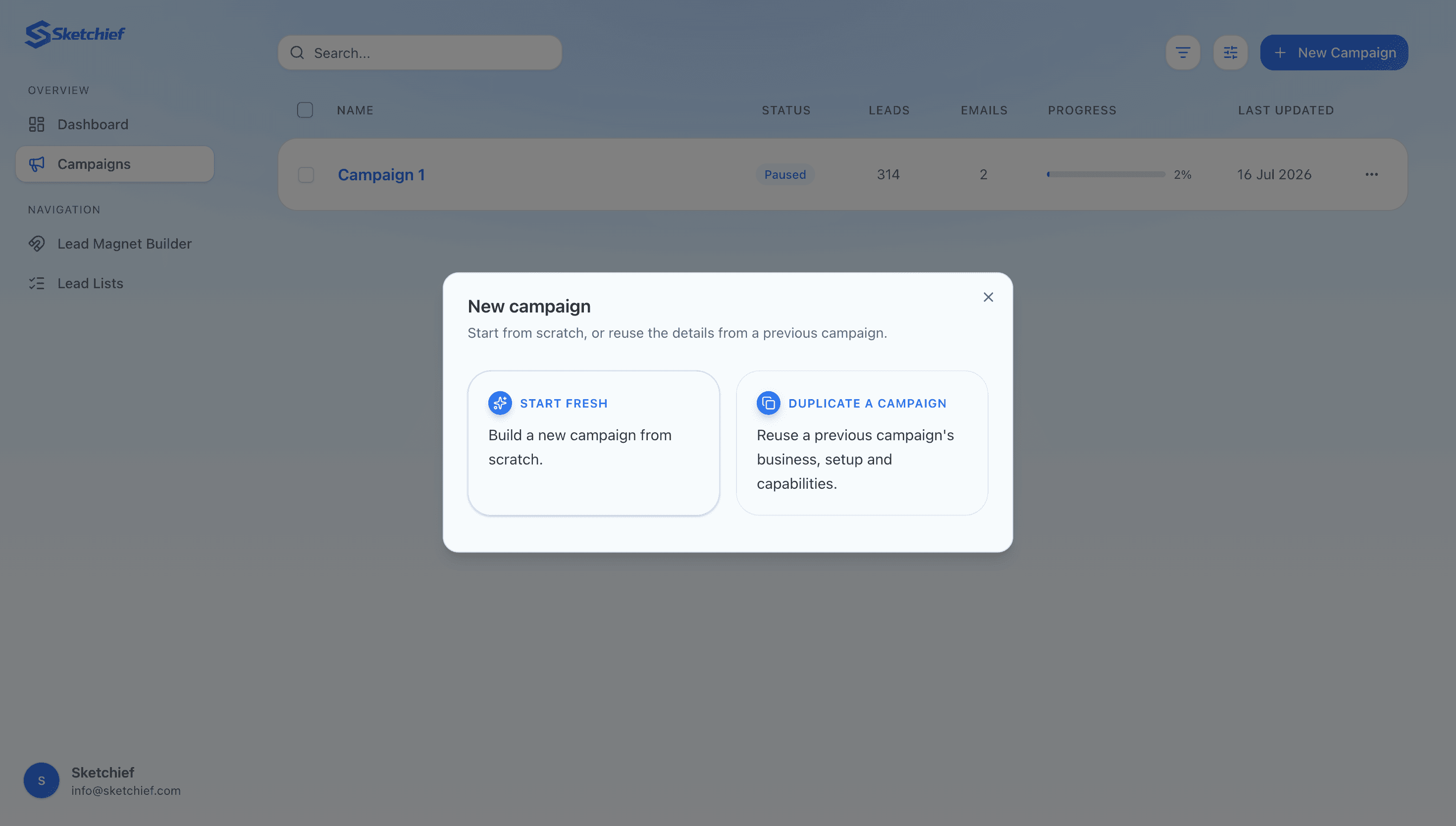
With your keys in, hit Start fresh in the top right and name your campaign.
Module 1: Business and ICP
Once you give your campaign a name you land in the AI planner. You answer a few questions about your business so it properly understands what you do, who you sell to, and what your customers actually care about.
This context drives every decision after it like who to target, what to offer, what to research, and ultimately what the email says.
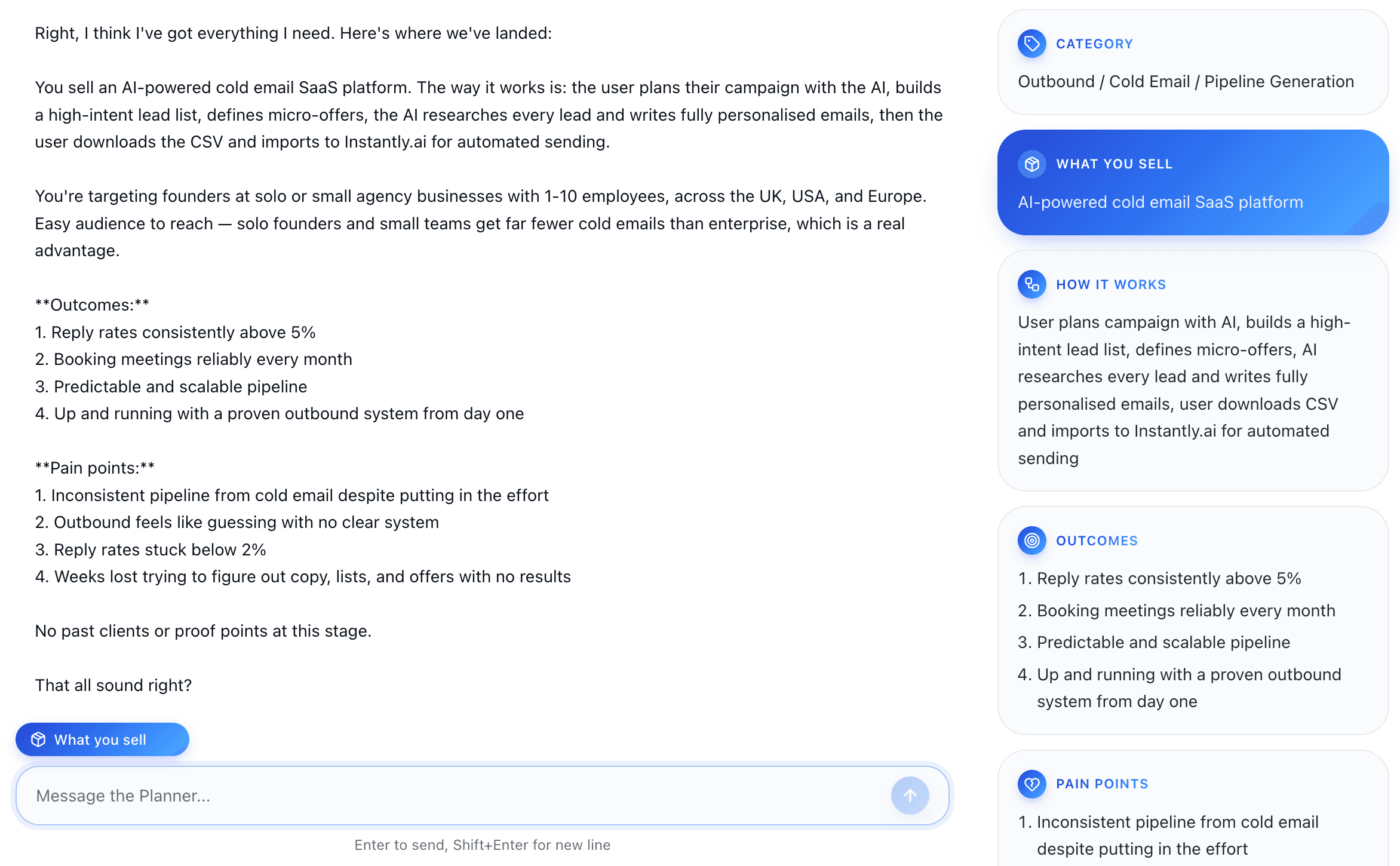
A few things worth knowing as you go through:
If you don't know an answer, ask what it recommends. It's not a form. It'll make suggestions based on what it already knows about your business.
It tracks everything on the notepad on the side, so the context carries through the whole campaign.
It pushes back. If your answer is too generic it won't just accept it, it'll ask you to be specific just like a real cold email consultant would.
When the section's done you get a summary. Read it properly, make sure it's right, then confirm and move on.
Module 2: List strategy
Now it knows your business, it can work out exactly what business would be best to target.
First it asks which tool you're using to build your list. This matters because it means the planner only recommends filters you can actually apply, rather than describing a perfect segment you have no way of finding.
Then it asks about exclusions. Businesses you've already contacted, current clients, or types of company you don't want. E.g. if you're targeting dental clinics, you might want to exclude NHS practices and corporate chains like Bupa.
Sub-segments. It then proposes several sub-segments with reasoning for each, and tells you which one it thinks is strongest.
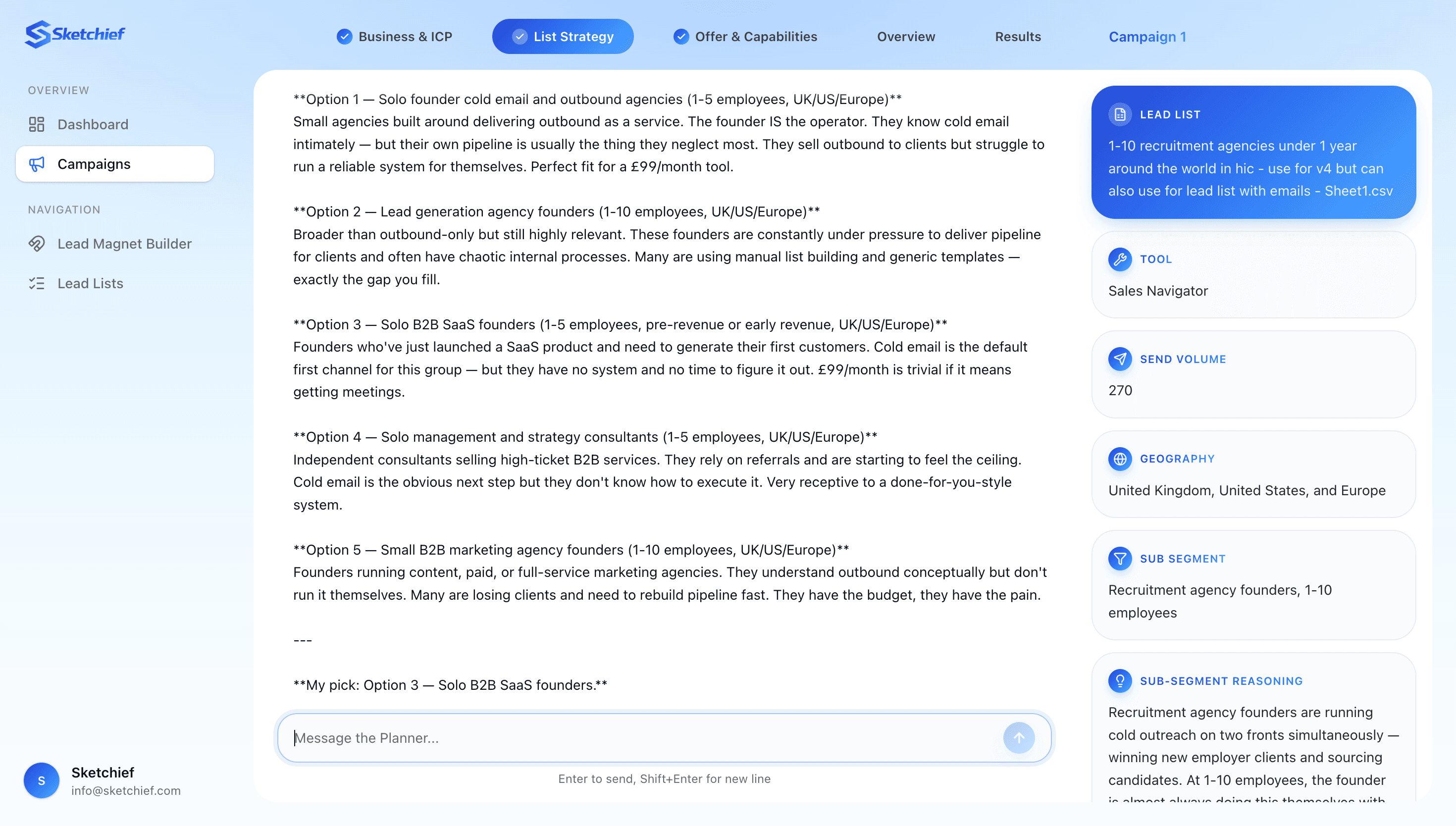
If you don't like the options, ask for more. If you know your market better than the reasoning suggests, back yourself.
Signals. Next it proposes signals for your chosen segment and recommends the strongest one. Stack them where you can, remember two relevant signals gives you better prospects and more to write with.
Filters. Once you've picked, it hands you the exact filters to build the list in your tool.
Before you export, tell it the lead count you're seeing. This is the step people skip and regret. If the segment's too narrow you won't have volume; too broad and you've burned credits on a list you'll have to rebuild.
Uploading your list
Build your list, then upload the CSV by clicking lead list at the top right.
Give it a few seconds to analyse and map your headers (Blue is mapped, grey is ignored).
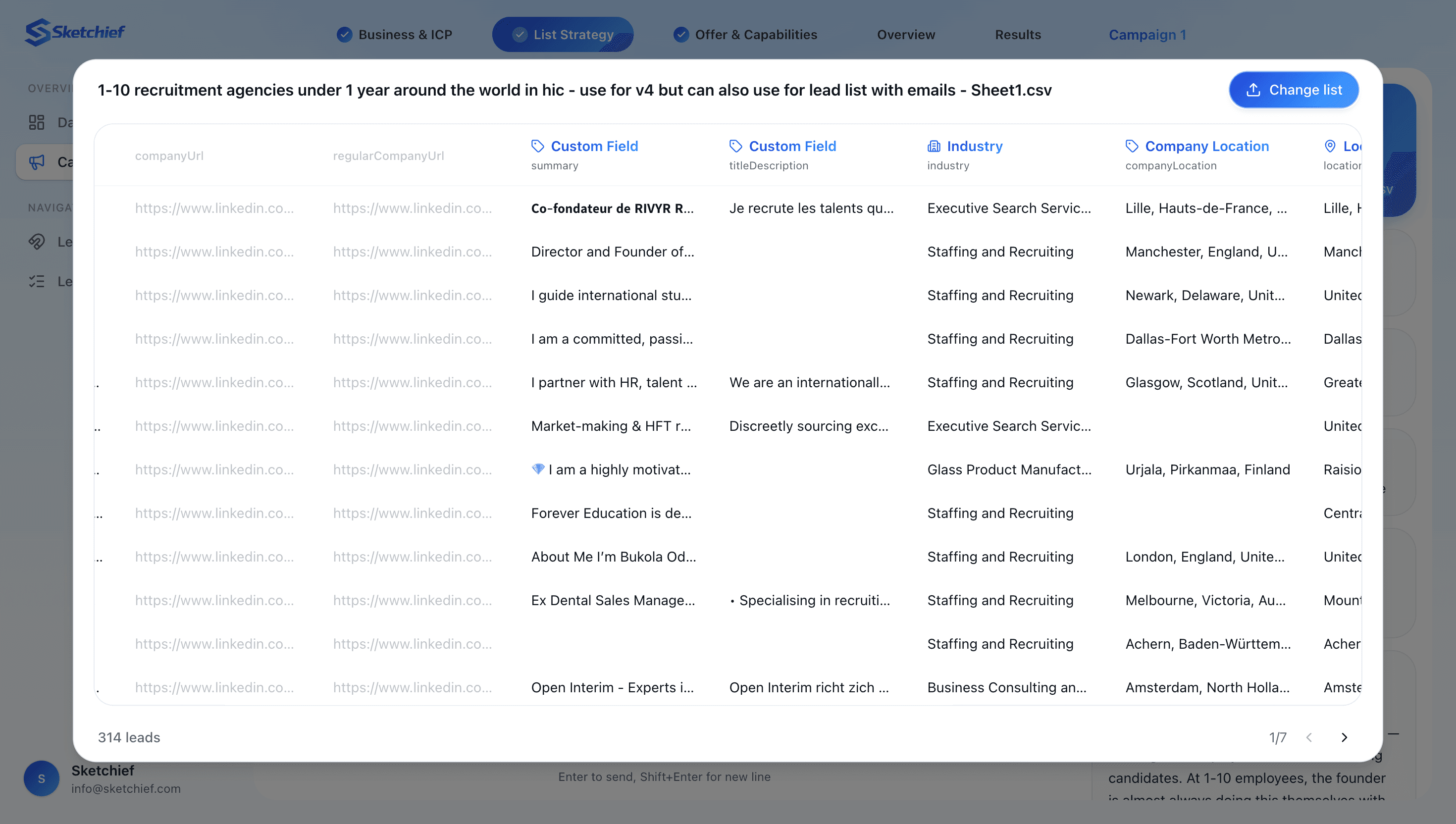
Check this carefully. If the mapping is wrong it will ruin the whole campaign, the research runs on the wrong fields and every email comes out wrong. If anything's off, tell it, then double-check it actually fixed it.
Once your happy confirm and move on.
Module 3: Offer and capabilities
Now you build the offer.
Sketchief works with micro offers, for the reasons covered above. But not every micro offer suits every person, plenty of people aren't comfortable recording video as a micro offer. So Sketchief first asks you what you're capable of so it doesn't recommend something your not comfortable doing.
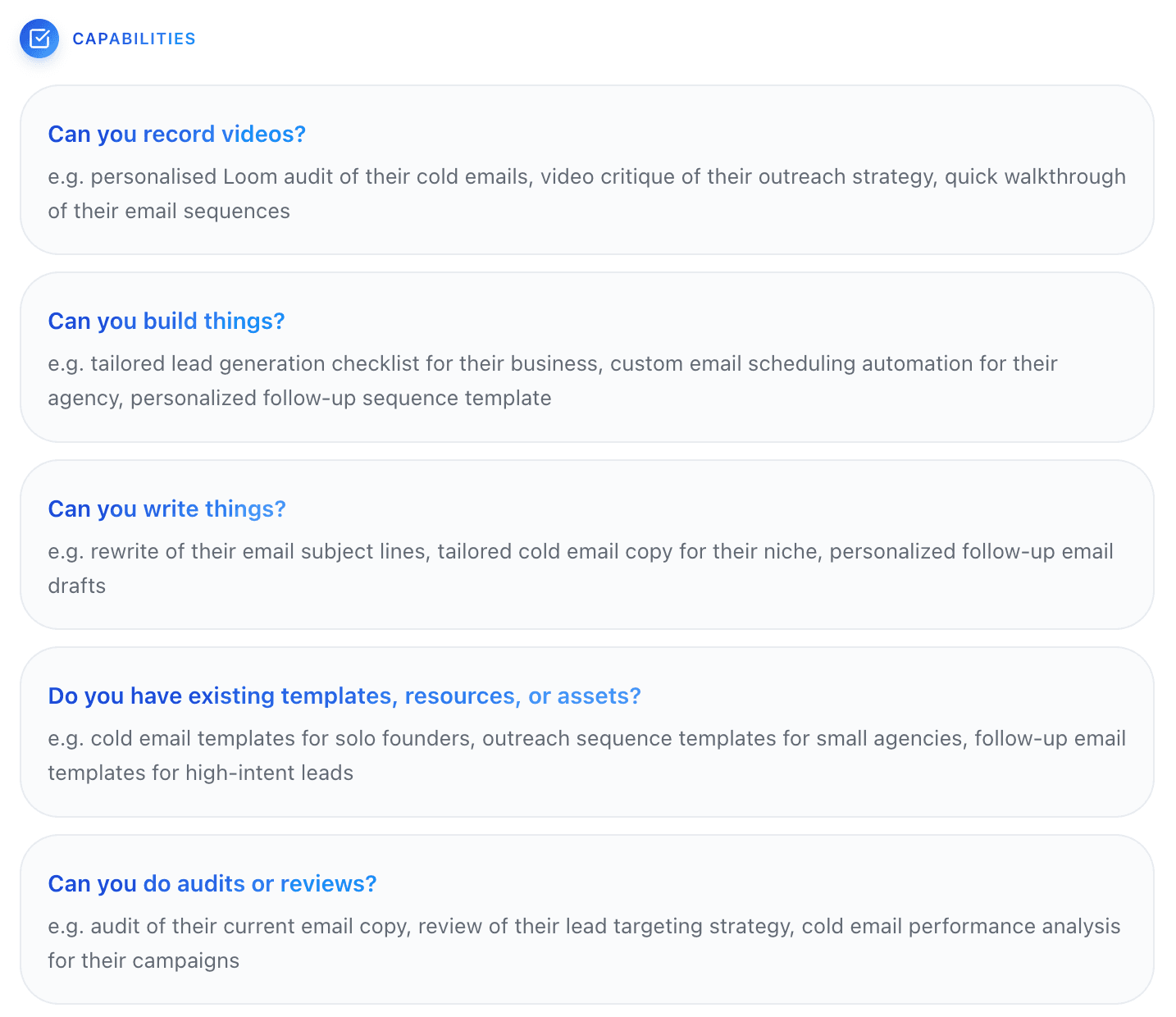
After a quick follow-up question, it proposes three micro offers.
Three, not one, because your prospects aren't identical. Not everyone needs the same thing, so having three lets the AI match the right offer to each individual lead rather than forcing one offer onto 258 different businesses.
For each one it gives you:
What it is: so you know exactly what you'd be building
The problem-solution loop: the problem it solves and the problem that creates
Why it fits this audience
How the researcher will personalise it per lead
If you only like two of them, ask for more ideas. And again, only keep offers you can actually deliver.
Planning the tips
Next it plans your follow-up tips. This is where you should slow down.
If you let the AI write these unguided, you'll get reasonable but generic advice. You're the expert. You know what actually moves the needle in your field and what's surface-level noise.
For each one, ask yourself: what's the single thing that makes the biggest difference here, that most of my prospects don't know? If you're genuinely stuck, ask Sketchief or Claude to help you articulate it, but the substance should come from you.
Capability offers
Roughly 90% of the time the copywriter will pick one of your three micro offers for a given lead. Occasionally none of the three fit that specific business, and it falls back to the capabilities you ticked earlier.
So it runs through those and asks which ones you'd rather it didn't use. Answer honestly, confirm the summary, and the planning is done.
That's the whole planning phase. Under 20 minutes.
Part 3: Generating the emails
After the planning, you land on the overview. From here it's all automated, the research engine goes through every lead individually, qualifies them against your targeting, hunts for the signals and any usable detail, and the copywriter turns that research into an initial email plus follow-ups.
Two choices first.
Opener style
Style | What it does |
|---|---|
Signal-based opener | Leads with what you noticed about them. No personal opener, straight to the signal and offer. |
Personalised opener | Opens with something specific about them personally, then connects to a signal about their situation. |
Hybrid | The researcher picks the best approach per lead. Strong personal research gets an opener, thinner research goes signal-only. |
If you want the best results go with signal-based or hybrid. Personalised openers are great when the research is rich, but weak personalisation is worse than none. E.g. "saw you went to Leeds Uni" doesn't earn a reply. Hybrid protects you from that automatically.
Tone
Tone | What it sounds like |
|---|---|
Conversational and direct | Casual but sharp. Short sentences. Reads like a message from someone who knows what they're talking about. |
Professional | Polished and composed. Still no corporate fluff, but more formal in register. |
Casual | Light, approachable. Lower-stakes feel. Works well for tight-knit niches and informal audiences. |
Bold and confident | Direct, assertive, no hedging. Strong claims. Best when there's strong proof and a sophisticated buyer. |
Custom | Describe the tone you want and the copywriter matches it. |
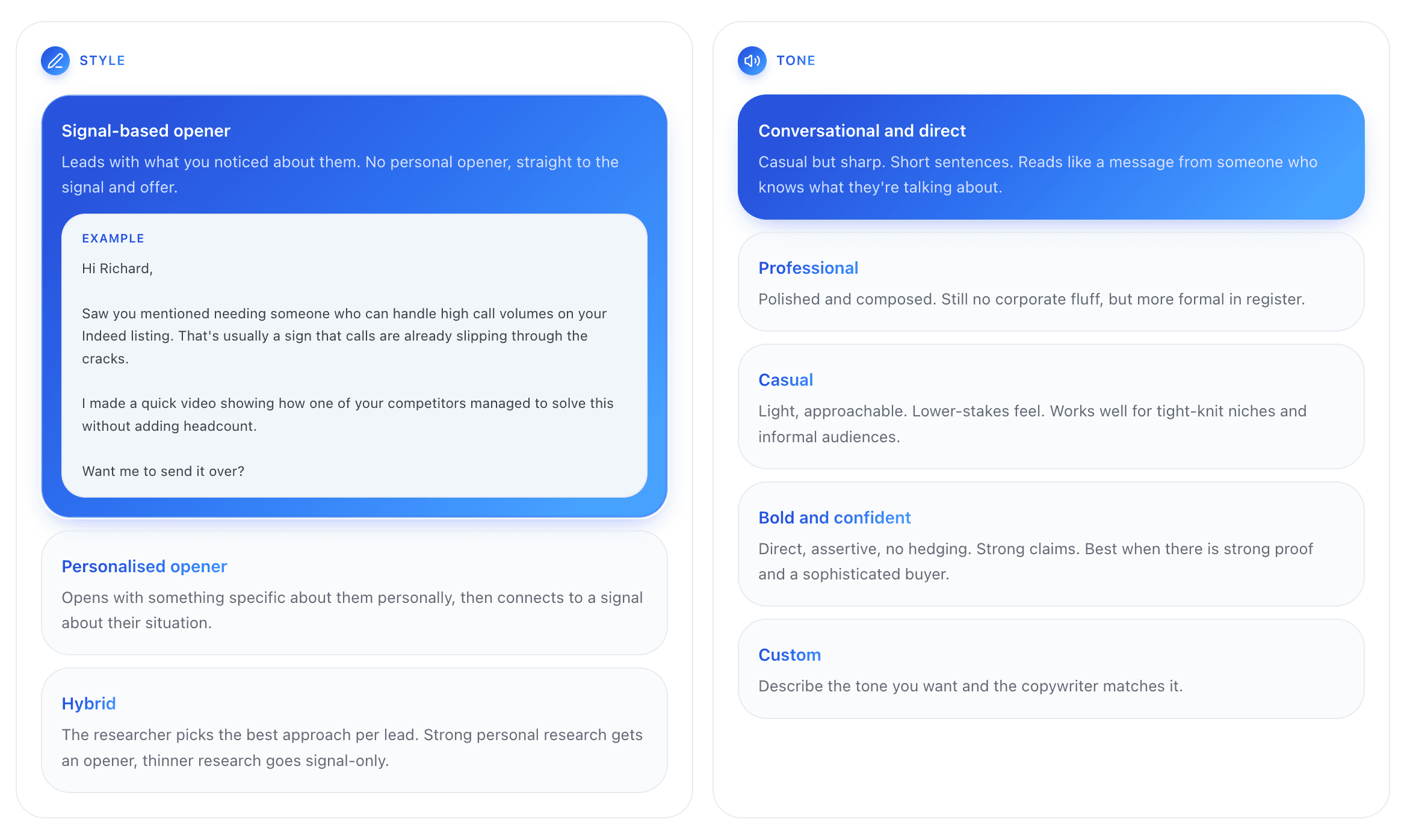
Conversational and direct is the safest default for most B2B. Bold and confident only works if you've genuinely got the proof to back it.
Then hit generate.
While it runs
The overview shows an approximate run time, so you can go and do something else, you'll get an email when it's finished.
If you're nervous about the output, let it run on 10 leads and pause. You'll get a feedback box on the overview where you can tell it what to say and what to avoid, then resume with those instructions applied.
The results
Once it's finished click on the Results tab to see everything. Scroll to the end and you'll see the exact business and signal research it did, the qualification (high/medium/low), which micro offer it picked and why, and then the initial email plus both follow-ups.
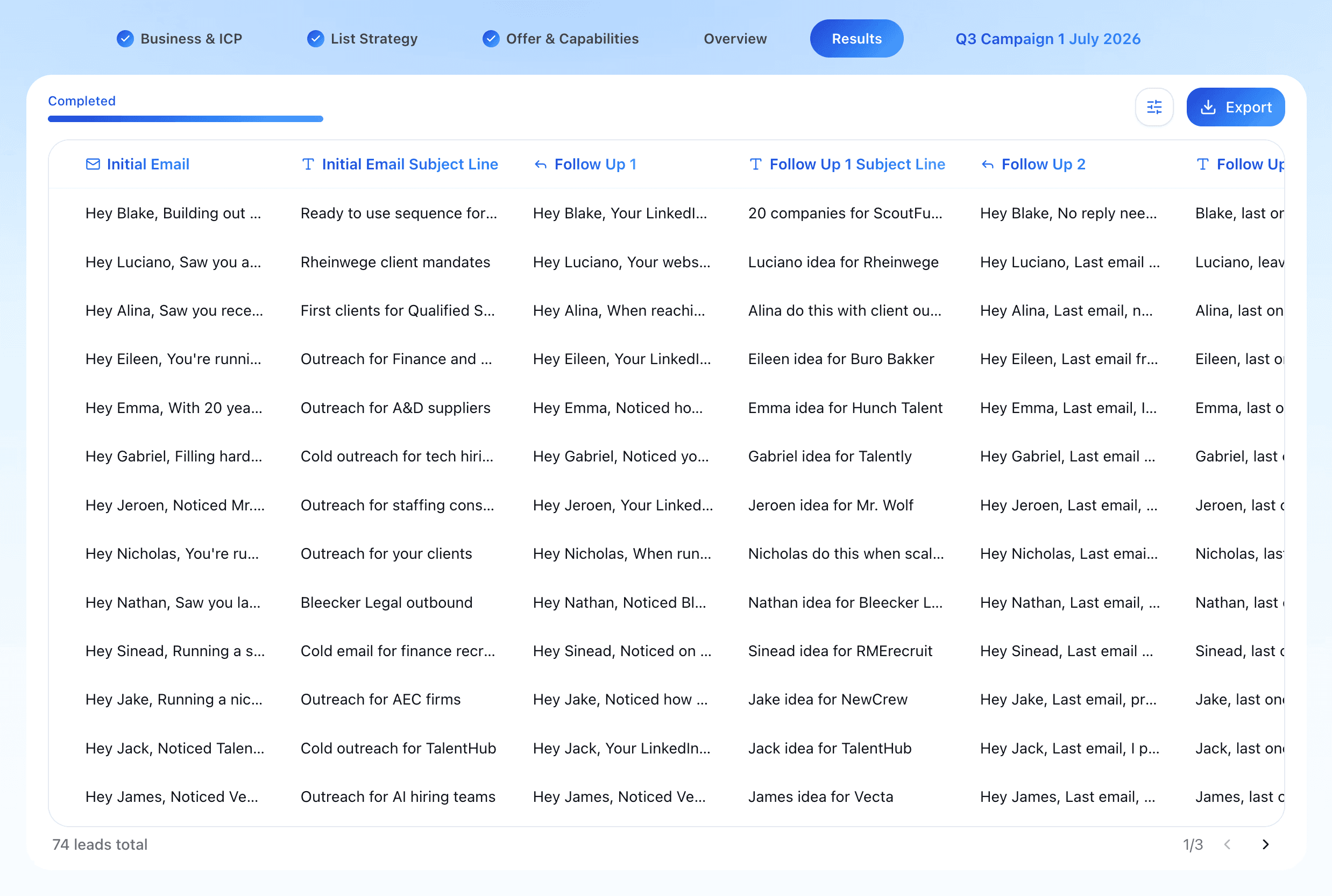
When you can filter how you want to export:
High only — smallest, strongest list
High + medium — the sweet spot for most campaigns
All with emails — everything that generated successfully
All including failed — don't. Half of these will import into your sequencer with blank emails (good for seeing who it removed and why).
If you only want to target people who will most likely reply go with high + medium.
Part 4: Actually sending it
You've got the campaign. Now it needs to go out.
You could send from your own Gmail, but you shouldn't. Two reasons: you can safely send about 30 cold emails a day from a normal account, which makes any real campaign take months. And if that domain gets flagged, every email you send (including to clients) starts landing in spam. Your main domain is not something you experiment with.
So use a dedicated sending tool. Instantly is the standard.
Getting inboxes
Sign up, head to Email accounts → Add new. You've got three options:
Pre-warmed accounts: already warmed, send immediately. Best if you want results this week.
Done for you: you buy inboxes through Instantly on your own domains and they handle warm-up. Takes 14–21 days, but you keep your branding. Good if budget's tight and you can wait.
Connect existing: for Google Workspace or Outlook accounts you already own and have warmed.
Pre-warmed is best for a first campaign. Momentum matters more than branding when you're trying to sign client number one.
Setting up the campaign
Once your inboxes are ready: Campaigns → Add new, name it, then:
Add leads → CSV, upload your Sketchief export
Map the headers, set initial email and every follow-up to custom variable
Sequences, type two curly brackets, select your variable, do the same for the subject line
Add step, set "send next message in" to 3 days, repeat with your follow-up variables
On the Growth plan you'll have two follow-ups rather than one, add a third step at 5 days
Schedule, set the timezone to match your leads (London for UK, Eastern for US), 9am–6pm, Monday to Friday
Options, connect your inboxes, keep "stop sending on reply" on, send as plain text rather than HTML
Then launch. Emails start going out the next business day, and Instantly will notify you when someone replies positively.
Part 5: What happens after a reply
Someone says yes, send it over. Now you build the micro offer, for that one person, properly.
Send it. Then run the problem-solution loop: they've got the first problem solved, here's the second problem it creates, here's how you fix that. That conversation is where the call gets booked.
And because they've already received something that genuinely helped them, you're not a stranger asking for time any more. You're someone who's already delivered. That trust is most of the reason this approach converts better than "worth a quick chat?"
But it only works if the micro offer is actually good.
If you do the lazy version, like record one video and send the same one to everyone, run a template audit with the name swapped, then you'll struggle to book calls, let alone sign anyone. The entire mechanism depends on it being obviously built for them. The moment it smells generic, you've spent your one shot and confirmed you're just another agency.
That's the trade. It takes real effort per prospect, which is exactly why it works when everything else in their inbox didn't.
FAQ
Does cold email still work in 2026?
Yes, but the bar has moved. Generic volume-based sending doesn't work any more because inboxes are saturated and filters are better. What works is narrow targeting, a real reason for contacting someone now, and leading with value instead of asking for a call.
How many emails a day can I send from my normal Gmail?
Around 30 for cold outreach, and you shouldn't anyway, flagging your main domain affects all your email, including to existing clients. Use dedicated sending domains.
What's the difference between a micro offer and a lead magnet?
A lead magnet is built once for thousands of people and applies to an industry. A micro offer is built for one specific prospect and applies to their business. That specificity is the entire reason micro offers get replies.
Do I have to build a micro offer for every lead?
No. You only build it after someone replies asking for it. Around 90% of any list won't respond, so you're building a handful, not hundreds.
How many leads do I need for a first campaign?
A few hundred well-targeted leads beats a few thousand loose ones. Check your count against your filters before exporting, too narrow and you've got no volume, too broad and you'll rebuild the list.
How long does Sketchief take to generate a campaign?
Planning takes under 20 minutes of your time. Generation runs in the background, you get emailed when it's done.
Why are leads removed?
They don't match the ICP, had stopped trading, or had nothing usable to research. Removing them saves API spend and, more importantly, protects your sending domain from irrelevant sends.
Do I need warmed inboxes?
Yes. Sending cold volume from cold inboxes is the fastest route to the spam folder. Either buy pre-warmed accounts or warm your own for 14–21 days first.
Start your first campaign
The fundamentals in this post are the whole game: a narrow segment, a real signal, a specific offer, a loop that leads somewhere, and follow-ups worth opening. Everything else is execution.
Create a free Sketchief account and build your first campaign.


